Find your way around
Avist keeps a consistent shell so you can move between catalog work, imports, and settings without relearning the layout.
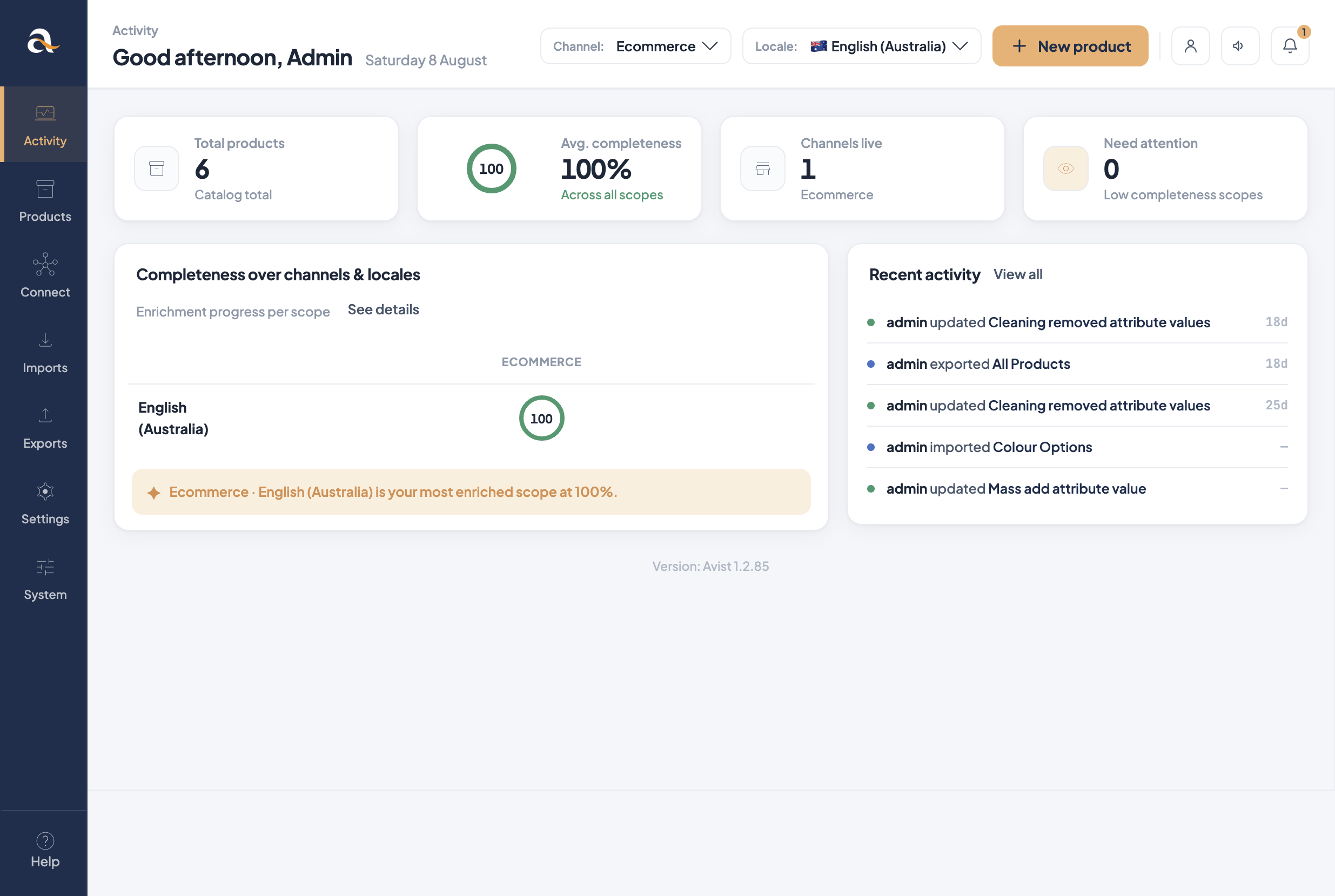
Main sidebar
- Activity — dashboard: totals, completeness, recent activity.
- Products — search, filter, and open product / product model records.
- Connect — connections to external systems (for example Shopify).
- Imports — import profiles (CSV / XLSX and related jobs).
- Exports — export profiles and download results.
- Settings — catalog structure: categories, channels, attributes, families…
- System — users, roles, and system-level configuration.
- Help — shortcuts to assistance (this Help Center when linked).
Channel and locale in the header
On Activity and Products you usually see Channel and Locale selectors (for example Ecommerce + English (Australia)). They change which scoped values and completeness figures you are looking at.
Example
If Description has Value per locale and Value per channel, switching locale from English (Australia) to another language shows a different text field for the same product.
Page header patterns
- Breadcrumbs show where you are (e.g. Settings / Attributes).
- Primary actions sit top-right (Create, Save, Create attribute…).
- Grids support search, filters, columns, and row actions (edit / delete).
Missing a menu?
Your user role may hide Settings, System, or Connect. Ask an
administrator if you need broader access.